
This page contains a wealth of resources to support teachers of students with visual impairments as they use Building on Patterns Kindergarten, Second Edition with their students. These resources are designed to provide teachers with additional background information, instructional strategies, and downloadable materials.
Teacher Resources
Contents
- Background Info
- Literacy Research
- Blending BOP With the General Education Curriculum
- Preschool to Kindergarten Transition
- Calendar Sequences for Increasing Independence
- Assistive Technology
- Assessment Overview
- Speaking and Listening
- Reading
- Writing
- Expanded Core Curriculum
- Tactile Graphics
- Additional Games
- Supplemental Activities for Using the Crayon Board and Color Words
- Acknowledgements and References
Some files are not yet available – this page will be updated frequently in coming weeks.
Background Information
Background of Building on Patterns, Kindergarten, Second Edition (.pdf)
The ABC Braille Study: Results and Implications for Teachers
by Anna M. Swenson
Background
The Alphabetic Braille and Contracted Braille Study (the ABC Braille Study) was the first research project to follow young children’s acquisition of braille literacy skills over a multi-year period (Emerson et al., 2009). It took place between 2002 to 2007 and tracked the progress of thirty-eight braille readers from pre-kindergarten or kindergarten to second, third, or fourth grade, depending on how long each participated in the study.
Abstract
While the ABC Braille Study suggests that early introduction of contractions correlates with stronger reading skills for students without additional disabilities, its more important finding is the failure of many elementary-aged braille readers to achieve grade level expectations in reading vocabulary and comprehension. The researchers concluded that instruction must focus not just on the braille code (which most study participants seemed to master with relative ease), but on basic reading processes. It is this author’s belief that teachers of visually impaired students need to do more than teach the braille code to beginning readers. They also have a responsibility to incorporate reading processes into their instruction, monitor student progress along with the classroom teacher, and be ready to take the lead in seeking further assessments, resources, and interventions if students start to fall behind.
Reference
Emerson, R. W., Holbrook, M. C., & D’Andrea, F. M. (2009). Acquisition of literacy skills by young children who are blind: Results from the ABC Braille Study. Journal of Visual Impairment & Blindness, 103(10), 610-624. https://doi.org/10.1177/0145482X0910301005
The complete article can be accessed at The ABC Braille Study: Results and Implications for Teachers – Paths to Literacy.
Kindergarten State Standards
Charts compiled from state standards for California, Maryland, Texas, and Virginia
Foundational Skills and Writing (.pdf)
Instructional Considerations for Students in Braille Literacy Programs
From Building on Patterns, Second Edition, Prekindergarten: Reference Volume, pp. 88-89.
Literacy Research
Literacy Research Behind BOP-K (.pdf)
Blending BOP With the General Education Curriculum
Information on integrating BOP-K into general education language arts activities
Blending BOP-K with the General Education Curriculum (.pdf)
Preschool to Kindergarten Transition
This article from the ConnectCenter website includes useful information for parents whose child is entering kindergarten: Navigating the Transition from Preschool to Kindergarten.
Calendar Sequences for Increasing Independence
Daily calendar activities build a child’s concepts and skills in the areas of oral language, literacy, tactile graphics, and math. The sequence below describes how to scaffold initial calendar instruction and gradually withdraw support to encourage independence.
- Preparation
- Teacher prepares calendar
- Child assists in preparing calendar (affixes month and days, writes year)
- Tracking, counting, and reading numbers
- Teacher speaks numbers while child tracks with hand-under-hand support as needed
- Child tracks and counts by rote using one-to-one correspondence with tactile and/or verbal teacher support
- Child tracks independently but may still need support with counting and reading numbers, especially those in the teens
- Child tracks and counts independently, reading most numbers
- Child tracks, counts, and reads numbers independently using number sequence to avoid or correct errors
- Updating the calendar
- Teacher models adding today’s date and checking for accuracy
- Child places today’s date with teacher guidance
- Child independently updates calendar with today’s date
Assistive Technology
Integrating assistive technology (AT) with literacy instruction can be highly motivating for children and builds a foundation for using these tools in later grades. Children must begin to see the benefits of technology at an early age to be successful academically and achieve maximum independence. As a teacher of students with visual impairments (TSVI), look for opportunities to expose the kindergarten student to AT devices and model their use in the educational setting. For example, use a notetaker to write the daily message and have the child track the line as you read it or listen to the message. Listening to synthetic speech will allow the child to become accustomed to it from an early age. Sometimes the general education technology lesson or computer lab session may not be an appropriate learning experience for the child with a visual impairment. This time could provide an opportunity to work individually with a child on specialized technology skills that are meaningful to them (Swenson, 2017, p. 253).
There are many useful technology tools for students who are blind or visually impaired. The TSVI plays a key role in providing access to appropriate devices and ensuring that the student receives the necessary instruction to become proficient in their use.
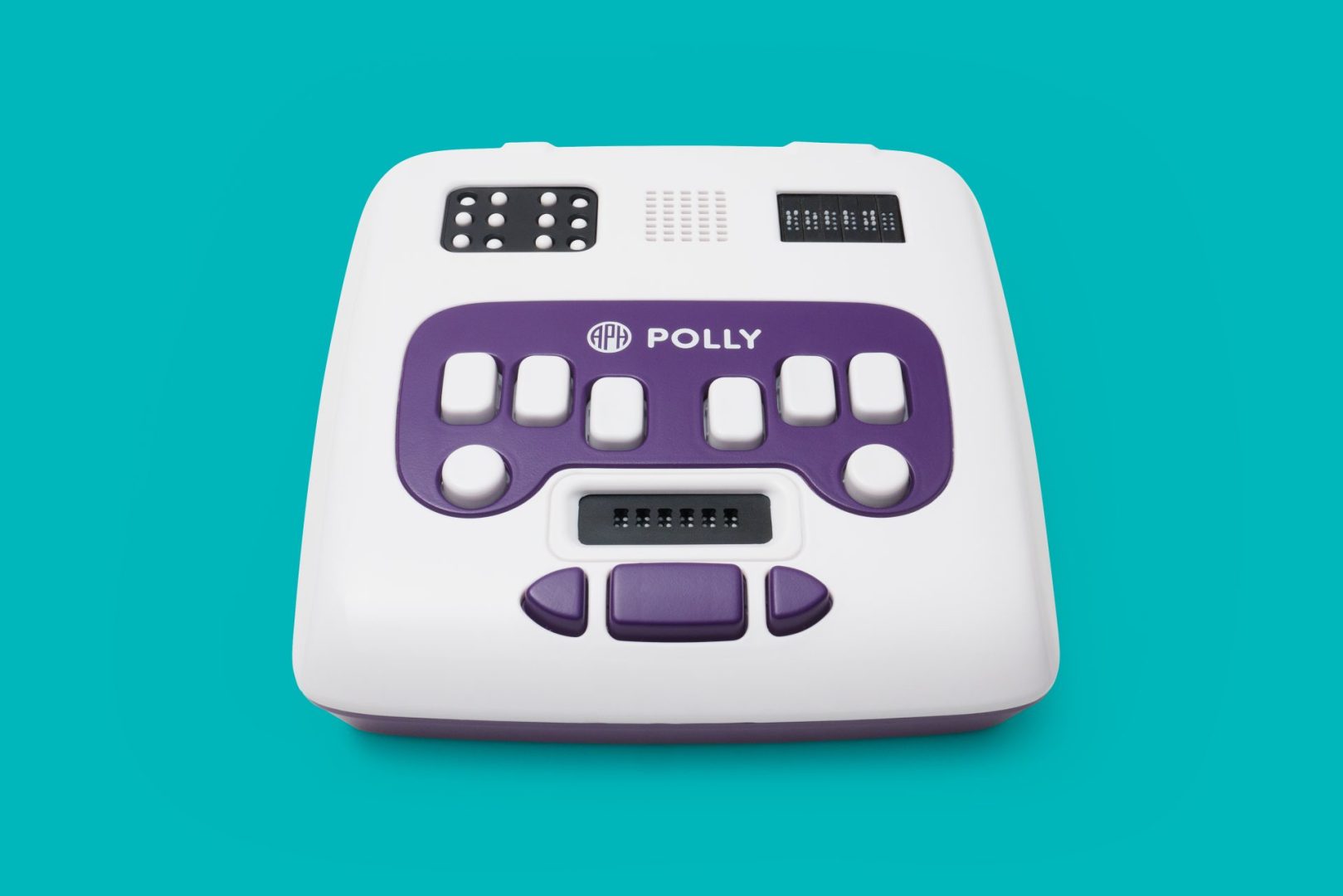
Devices such as the APH Polly are educational and appropriate for a kindergarten-age child learning to read braille. (See the Polly Menu Map for an outline of available activities.)
Building Your Braille Literacy Toolkit offers a list of additional popular APH products and resources for braille literacy, including assistive technology devices.
APH instructional videos and webinars can be found on The Hive and Access Academy.
In addition, the TSVI may consider the products listed below that could be helpful in computer class as the child begins to learn coding skills. Note: Code Jumper is recommended for ages 7–11 but could be introduced in kindergarten depending on the level of the child’s computer knowledge, skills, and interest.
CodeQuest (iPad and iPhone App)
Reference
Swenson, A. M. (2015). Beginning with braille: Firsthand experiences with a balanced approach to literacy (2nd ed.). APH Press.
Assessment Overview
BOP-K Assessment Overview (.pdf)
Speaking and Listening
Describing Images and Illustrations (.pdf)
Oral Language and Vocabulary Behaviors (.pdf)
Reading
Letter Sound Video
Teacher modeling of correct letter sounds is crucial when teaching children to read. The following video demonstrates the correct pronunciation of the 44 phonemes key to the English language: 44 Phonemes (YouTube)
Sound-Word Key for BOP-K
Phonetic symbols used in BOP-K, along with examples, can be found in this sound-word key.
Note: There is no sound word for the letter c since it has either the /k/ sound or the /s/ sound, but no sound of its own. Also the letters qu have the /kw/ sound and the letter x has the /ks/ sound.
| Symbol | Examples | Symbol | Examples |
|---|---|---|---|
| /a/ | apple | /n/ | nose |
| /ā/ | apron, tape | /o/ | October |
| /b/ | boy | /ō/ | open, grow |
| /ch/ | chin | /ô/ | call |
| /d/ | door | /p/ | paper |
| /e/ | elbow | /kw/ | question |
| /ē/ | eat | /r/ | ring |
| /f/ | finger | /s/ | soap, city, grass |
| /g/ | girl | /sh/ | shoulder |
| /h/ | hand | /t/ | teeth |
| /i/ | itch | /th/ (unvoiced or voiced) | thumb, tooth, them, other |
| /ī/ | ice, my, pie | /u/ | umbrella |
| /j/ | jacket | /ū/ | ukulele |
| /k/ | key, coat | /v/ | voice |
| /ks/ | box | /w/ | window, wheel |
| /l/ | leg | /y/ | yarn |
| /m/ | mouth | /z/ | zipper, cars |
High Frequency Words in BOP-K
The BOP-K high frequency words were chosen after careful review of several kindergarten high frequency word lists, including Zeno Sight Words, Fry First 100 Sight Words, Dolch Kindergarten Sight Words, and other general education curricula word lists. Based on this review, 61 sight words including some alphabetic wordsigns were chosen to be presented as high frequency words in this program. These words were selected from the most frequently occurring words across the various sight word lists. Priority was also given to words that are alphabetic wordsigns, and words that are useful in creating meaningful connected text was a consideration.
BOP-K High Frequency Words
| a | did | have* | like* | of | so* | we |
| all | do* | he | little | on | that* | what |
| and | down | here | look | one | the | who |
| are | for | I | me | out | there | will* |
| as* | friend | in | more* | people* | they | with |
| at | from* | is | my | play | this | you* |
| be | get | it* | no | said | to | your |
| but* | go* | its | not* | see | two | |
| can* | good | jump | now | she | was |
*alphabetic wordsign
Focus Letters, Contractions, and Words: Individualizing Instruction
Information on how to individualize instruction for pairs of similar letters or contractions that may be confusing for children:
Focus Letters, Contractions, and Words: Individualizing Instruction (.pdf)
Sources of Braille Books
Young children learning to read braille need to have lots of experience with books written in braille. Sources for braille books that include many appropriate for early readers, with some at no cost, maybe be found at Paths to Literacy: Sources of Braille Books.
Writing
Braillewriter Information (.pdf)
Forward Chaining Method for Name Writing (.pdf)
Stages of Writing Development in Young Children (.pdf)
Transcript of an Early Guided Writing Lesson
During guided writing activities, the child does all the writing in invented spelling with support from you. The goal is to promote understanding of the alphabetic principle by facilitating invented spelling, an approximation of conventional spelling where the child segments the sounds in words and writes the corresponding letters. Prerequisite skills include the ability to use correct fingering on the braillewriter, isolate the fingers to press individual keys, braille individual characters when given the dot numbers, and match some initial consonant sounds to letters. In BOP-K, guided writing is introduced in Lesson 6.
In the transcript below, five-year-old Sean has just finished building a large structure with blocks in his kindergarten class. During the guided writing activity that follows, he decides to write the sentence “I made a bridge.” Based on her knowledge of Sean’s developmental level in writing, the teacher emphasizes only initial consonant sounds and taps his hand lightly after each word to remind him to space.
Teacher: “I made a bridge.” That’s a great sentence! Do you remember how to write the word I? What does it always start with?
Sean: A dot 6. (Writes capital I.)
Teacher: Right! I made … /m/ … made. What letter does made start with?
Sean: /m/ … /m/ … It starts with m. How do you make an m?
Teacher: That’s a new letter for you. M is dots 1, 3, and 4. (Sean positions his fingers and writes m.) Yes, that’s it. You wrote m with dots 1, 3, and 4. Now your writing says, “I made …” What word comes next?
Sean: I made … a … It’s a, and I know how to write that!
Teacher: Yes, you remembered that a is written with dot 1. Good for you! Now, read your sentence and tell me what the last and most important word is.
Sean: (Sean reaches up and reads his writing with some support.) I made a … bridge!
Teacher: You’re right again! Listen … bridge … /b/ … /b/ … bridge. What letter makes that /b/ sound at the beginning of bridge?
Sean: It’s a b. I can write that, too. (Sean writes the letter b.)
Teacher: Yes, b is dots 1 and 2. You’re done! Now you can read your sentence and make a picture.
Sean’s message, which uses only the high frequency word I and initial consonant sounds, is shown below. (The teacher provided a tactile prompt to remind him to space between words.)
I m a b
⠠⠊⠀⠍⠀⠁⠀⠃
The following chart provides examples of the same message written at several different developmental levels. When the child masters a skill, such as isolating beginning consonant sounds in words, phase out those cues. Then, focus on helping them hear a greater number of sounds in each word, using the Spelling skill sequence from the Independent Writing Progression as a guide. Remember that this developmental spelling sequence is only a rough guide. The child may hear and match sounds in a different order to that shown in the writing samples below or demonstrate a mixture of spelling skills within the same sentence.
| Child’s Writing | Teacher’s Cues |
|---|---|
| I m a b
⠠⠊⠀⠍⠀⠁⠀⠃ |
Beginning consonant sounds only |
| I md a bj
⠠⠊⠀⠍⠙⠀⠁⠀⠃⠚ |
Beginning and ending consonant sounds |
| I mad a brj
⠠⠊⠀⠍⠁⠙⠀⠁⠀⠃⠗⠚ |
Named vowel sounds (“mad” for “made”)
Both letters in blends (br in “bridge”) |
| I made a brij
⠠⠊⠀⠍⠁⠙⠑⠀⠁⠀⠃⠗⠊⠚ |
Conventional spelling of high frequency words (“made”)
Short vowels (short i in “bridge”) |
Expanded Core Curriculum
The Expanded Core Curriculum (ECC) addresses nine specific skill areas that should be part of specialized instruction for students who are blind and visually impaired. An overview of the ECC skills, along with additional resources and tools for teachers, may be found at Paths to Literacy: Expanded Core Curriculum.
Tactile Graphics
Introducing Tactile Graphics to Young Children (.pdf)
Creating Tactile Pictures (.pdf)
Materials for Making Tactile Graphics
Tactile graphics add interest to written materials and are lots of fun! It’s helpful to build and keep on hand a collection of materials for making tactile graphics such as the following:
- APH products for creating tactile graphics (Feel ‘n Peel Stickers, Feel ‘n Peel Sheets: Carousel of Textures, Graphic Art Tape, and much more!)
- Pipe cleaners
- Pompoms
- Rickrack and ribbon
- Bows
- Googly eyes
- Sequins
- Beads
- Fuzzy dots
- Feathers
- Textured fabrics (lace, velvet, corduroy, satin, felt, fur)
- Foam sheets
- Aluminum foil
- Construction paper
- Tissue paper
- Cellophane
- Cork
- Sponges
- Craft sticks
- Buttons
- Cotton balls
- Cotton swabs
- Textured stickers
- Bedazzle gems
- Yarn and string
- Waxed yarn
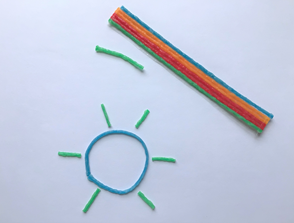
Pictured here are flexible, waxy sticks that adhere to a variety of surfaces and can be removed without leaving any residue. The waxed yarn featured in the above picture is Wikki Stix produced by Omnicor, Inc.
- String
- Packing peanuts
- Bubble wrap
- Fiber fill stuffing
- Clothespins
- Paper plates
- Bowls
- Modeling clay
- 3D fabric paint
- Glitter glue
- Hook and loop fastener
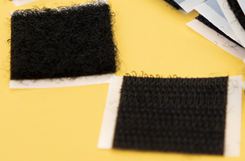
Pictured here are two types of fabric that mesh when pressed together. The “loop” fabric is soft and the “hook” fabric is rough.
Materials for Tactile Markers
The type of marker you choose will depend on the activity, the materials you have on hand, ease of use and detection, whether the mark will be removed or repositioned, and so forth.
When marking answers independently on a workbook page, children may begin with one or more of the following markers:
- Pushpins on a corkboard
- Small pieces of waxed yarn
- Stickers
- Magnets (when the workbook page is placed on a magnetic board)
- Poster tack (also called plasti-tack, sticky tack, mounting putty)
Additional Games
Race to the Finish (vowel sounds practice)
Discriminating letter sounds
The Race to the Finish game appears in BOP-K Lesson 6 as a fun way to practice discriminating the vowel sounds /a/ and /i/. This activity can be adapted to practice any two letter sounds, such as the following:
- Vowel pairs, such as /e/ and /i/ or /o/ and /u/
- Consonant pairs, such as /j/ and /w/ or /k/ and /g/
Materials Needed
- APH Score Card and APH Feel ‘n Peel stickers: Braille-Print Alphabet Letters (see Teacher Preparation)
Teacher Preparation
Choose two letter sounds that the child needs to practice. On a Score Card, attach one chosen letter sticker to the left of the first row and the other chosen letter sticker to the left of the second row.
Directions
For Vowels: Give the prepared Score Card to the student and ask them to identify the two vowel letters you have chosen, recall each key word, and say its initial sound.
For Consonants: Give the prepared Score Card to the student and ask them to identify the two letters you have chosen and say each initial sound.
Remind the child that this game is a race. The first letter with five points will be the winner. Say one word and ask the child to listen for the beginning sound. Have them press the dot in the correct letter’s row after each spoken word.
Tic-Tac-Toe with a Twist (letters, words, or numbers practice)
Materials Needed
- 9-Square Game Board
- Materials for making 16 letter, word, or number cards
Teacher Preparation
Choose two letters, words, or numbers that the child needs to practice. Make eight cards each of the two letters, words, or numbers chosen.
Directions
These directions use the letters n and z as an example. Give the child the 9-Square Game Board and ask them to locate each of the nine squares. Next, give them one card each with the letters n and z and ask them to read each card (see Teacher Preparation). Tell them that they will play a game called Tic-Tac-Toe with a Twist with the letters n and z. Ask the child to help you shuffle eight cards each for the letters n and z, then place them in a draw pile and determine a location for the discard pile. Use the APH Draw/Discard Rack if desired.
As needed, tell the child the goal of the game is for one player to get three of their letter cards in a row, horizontally, vertically, or diagonally, which is called a tic-tac-toe.
Explain and play the game as follows:
- Each player chooses a letter, n or z.
- Players take turns drawing letter cards.
- If the player draws their letter, they may place it anywhere on the board. If the player draws the other letter, they lose their turn, and place the card in the discard pile.
- If needed, reshuffle the cards from the discard pile and place them in the draw pile.
- The first person to get a tic-tac-toe with their three letters in a row wins!
Magic Numbers (numbers, letters, letter sounds, contractions, or words practice)
Materials Needed
- Wooden Cube from Manipulatives Pack (see Teacher Preparation)
- APH Feel ‘n Peel Stickers: UEB Braille/Print Numbers 0–100 or adhesive braille labels to attach to number cube (see Teacher Preparation)
- APH Score Card
- Tactile markers for orienting the cube if using letters or contractions (see Variations)
Teacher Preparation
Choose three numbers with which the child is proficient and three numbers with which the child needs additional practice. Place one number on each side of the cube. Use APH Feel ‘n Peel Stickers: UEB Braille/Print Numbers 0–100, or braille the numbers on adhesive braille labels.
Directions
Give the child the prepared number cube and review the six selected numbers. Tell them you will each take turns rolling the number cube and reading the number. Inform them that in this game, three numbers on the cube are magic numbers (the three with which the child needs additional practice). Tell the child the magic numbers for the game. Each time a magic number is rolled and read correctly; a point is scored. Allow the child to keep score using the Score Card. The first person to get five points wins the game! The game can be replayed with the same or different magic numbers.
Variations
Play the game with letters, letter sounds, contractions, or CVC words. Mark the orientation of the braille with a tactual dot or line.
Supplemental Activities for Using the Crayon Board and Color Words
What’s the Color?
Materials Needed
- Sturdy piece of white paper, such as braille paper
- Materials to create a tactile outline, such as waxed yarn or APH Graph Benders (unless using an online program to create your outline)
- Crayon board or labeled crayons
- Optional: APH Color-By-Texture Marking Mats or a piece of sandpaper
Teacher Preparation
On a piece of paper, create a tactile outline of an object for the child to color in. For example, create the outline of a pair of jeans, a sun, or a plant.
Directions
Tell the child what the picture is as they explore it. Say the name of the item and ask what color it is. Model how to read the labels on the crayon board or labeled crayons to find the corresponding color crayon. The child can color in the outline and then replace the crayon where it belongs. Together, think of more items that can be outlined for coloring. Note: Consider using one of the APH Color-By-Texture Marking Mats or a piece of sandpaper under the paper to add interest to the child’s coloring product.
Color Bingo
Materials Needed
- Two 9-Square Game Boards and materials for 20 color word cards, as needed, for Color Bingo game (see Teacher Preparation)
- Materials to label each of the nine squares on the boards with a different color word, such as APH Braillable Labels, label tape, or trimmed index cards
- Crayon board or labeled crayons
Teacher Preparation
Gather or make two cards each with the words red, blue, green, yellow, orange, black, brown, white, pink, and purple. Label the squares on each board with nine color words of your choice. If using trimmed index cards, the cards should be 3 inches wide or less.
Directions
Give one prepared bingo board to each player and ask them to read all the color words in the squares. Explain that in this game players need to find a match for each color on their board.
Shuffle the 20 color cards (two for each of the ten colors) and place them in a pile. Tell the child that each player will take turns drawing a card, reading the color, and looking for a match on their board. If the color word matches a color on the player’s bingo board, they find the correct crayon, color firmly inside the square over the braille color word, and return the crayon to the crayon board (if used) or container. Each drawn card is returned to a discard pile. The first player to color in all their squares says “Bingo” and wins the game. If all the cards are drawn and no one has a “Bingo,” reshuffle the discard pile and continue playing until someone wins.
Acknowledgements and References
Acknowledgements, References, and Proper Trademarks Notice and Attribution (.pdf)